Offscreen
the color lives offscreen.
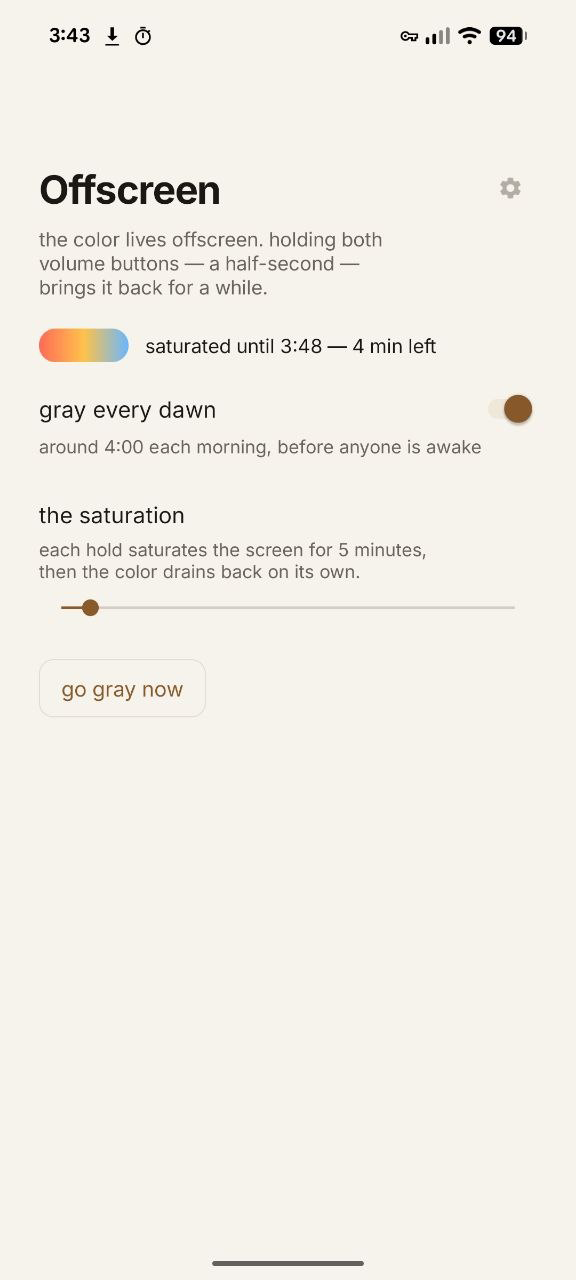
offscreen tries to help you notice the richness and beauty of your world, by making your phone a little less interesting.
this should be happening on this page right about...now.
what it does
every morning at 4am, your phone's display goes grayscale. your apps still work, they just start out without color.
when a friend sends you baby photos, press both volume buttons down for a half-second. color will flow back into the screen for twenty minutes (or however long you choose), then return back to grayscale after.
this works the other way, too. if you're done with color early, just press again and the grayscale comes back.
what it doesn't do
offscreen doesn't tell you not to browse instagram. it is perfectly happy to be turned off, set to stay in color until the next day. its role isn't to judge or shame you into behavior change.
it's also not creeping on you, it has no internet access, it couldn't secretly collect data if it tried. there's no accounts, no dashboard, etc.
around day twelve, the app will ask once whether it's changed anything, and request to send some data or written feedback to me. you'll be able to see that it's not sharing anything that feels too personal before sending, but i would appreciate finding out how well it's working for you, in any way you want to share.
setting it up
android only lets an app change color settings if a computer gives it permission, so installation takes a few extra minutes (about 3-5 total). this page will walk you through that process, right in the browser. tap each circle as you go, and the page will save your place.
i notice you're reading this on a phone — nice, that's the phone it goes on. for the computer steps, any laptop with chrome works — yours, or a friend's.
- grab your android phone, a computer with chrome, and a usb data cable.
- phone settings → about phone → tap "build number" seven times (your phone will congratulate you).
- phone settings → system → developer options → turn on usb debugging (on samsung, developer options sits at the bottom of the main settings list.)
- plug the phone into your computer and open this page. press the button below, and when the phone asks "allow usb debugging?", tap allow.
this browser can't talk to phones over usb — the in-page installer needs chrome or edge on a computer. open this page there, or use the do-it-yourself lines below.
- when the page says done, offscreen opens on the phone by itself — unplug and take it from there. (later, you'll find it in the app drawer.)
prefer to run it yourself?
download offscreen.apk
(3.3 mb · sha-256 fd868cf905ea0779…)
mac or linux, one line — it fetches google's adb if you don't have it, installs, and grants:
curl -fsSL https://aphonethatcares.com/offscreen/install.sh | sh
or, if adb is already your friend:
adb install -r offscreen.apk
adb shell pm grant com.ptc.graydawn android.permission.WRITE_SECURE_SETTINGS
the script is forty-odd readable lines — worth a skim before you pipe anything into sh, this one included.
will it work on my phone?
built and tested on a pixel (android 14), but it uses standard android features, so recent samsungs and motorolas should work — with one extra step on samsung: set offscreen's battery to unrestricted and add it to never sleeping apps (settings → battery), or samsung will turn off the 4am alarm after a few days. and if your phone has a bedtime mode that grays the screen on a schedule, i'd turn that off so there's no conflict there.
on an iphone?
there's no app possible for the iphone, but i think you could probably jerry-rig something like this with a "grayscale" focus mode that triggers desaturation. if you have a process to do that, let me know and i'll link or include it here.